Navigate OpenStreetMap using a gamepad
Just over a month ago, I built a website where you can navigate a map using a gamepad: maps.neilvan.com. The site is still navigable with a mouse or touch. The gamepad works thanks to the Gamepad API.
My younger brother has an XBox 360 controller which I used for this project. I started off by asking Qwen2.5-Coder-32B-Instruct for a scaffolding code then refined it according to my requirements. This is the whole JS for the site:
function initMap() {
  map = L.map("map").setView([37.7749, -122.4194], 12); // San Francisco

  L.tileLayer("https://{s}.tile.openstreetmap.org/{z}/{x}/{y}.png", {
    maxZoom: 40,
    attribution: "© OpenStreetMap contributors",
  }).addTo(map);
}

let controllerIndex = null;
let isZoomingIn = false;
let isZoomingOut = false;

window.addEventListener("gamepadconnected", (event) => {
  const gamepad = event.gamepad;
  controllerIndex = gamepad.index;
  console.log("connected", gamepad.id);
});

window.addEventListener("gamepaddisconnected", (event) => {
  controllerIndex = null;
  console.log("disconnected");
});

function handleZooming(buttons) {
  if (buttons[1].pressed && !isZoomingOut) {
    // 'B' button for zoom out
    map.zoomOut();
    isZoomingOut = true;
  } else if (!buttons[1].pressed) {
    isZoomingOut = false;
  }

  if (buttons[0].pressed && !isZoomingIn) {
    // 'A' button for zoom in
    map.zoomIn();
    isZoomingIn = true;
  } else if (!buttons[0].pressed) {
    isZoomingIn = false;
  }
}

function handlePanning(axes) {
  // right is positive
  const leftRightAxis = axes[0];
  // down is positive
  const upDownAxis = axes[1];

  const currentZoom = map.getZoom();

  let step;
  if (currentZoom > 19) {
    step = 0.00001;
  } else if (currentZoom > 16) {
    step = 0.0001;
  } else if (currentZoom > 12) {
    step = 0.001;
  } else if (currentZoom > 9) {
    step = 0.01;
  } else if (currentZoom > 6) {
    step = 0.1;
  } else {
    step = 1;
  }

  const currentCenter = map.getCenter();
  let newCenter = null;

  if (upDownAxis === -1) {
    // stick up
    newCenter = [currentCenter.lat + step, currentCenter.lng];
  } else if (upDownAxis === 1) {
    // stick down
    newCenter = [currentCenter.lat - step, currentCenter.lng];
  } else if (leftRightAxis === -1) {
    // stick left
    newCenter = [currentCenter.lat, currentCenter.lng - step];
  } else if (leftRightAxis === 1) {
    // stick right
    newCenter = [currentCenter.lat, currentCenter.lng + step];
  }

  return newCenter;
}

function gameLoop() {
  if (controllerIndex !== null) {
    const gamepad = navigator.getGamepads()[controllerIndex];

    handleZooming(gamepad.buttons);
    const newCenter = handlePanning(gamepad.axes);
    if (newCenter) {
      map.panTo(newCenter, { animate: false });
    }
  }

  requestAnimationFrame(gameLoop);
}

window.onload = function () {
  initMap();
  gameLoop();
};
I had to test how the physical gamepad is mapped to the Gamepad API. Here’s the Xbox 360 controller diagram:
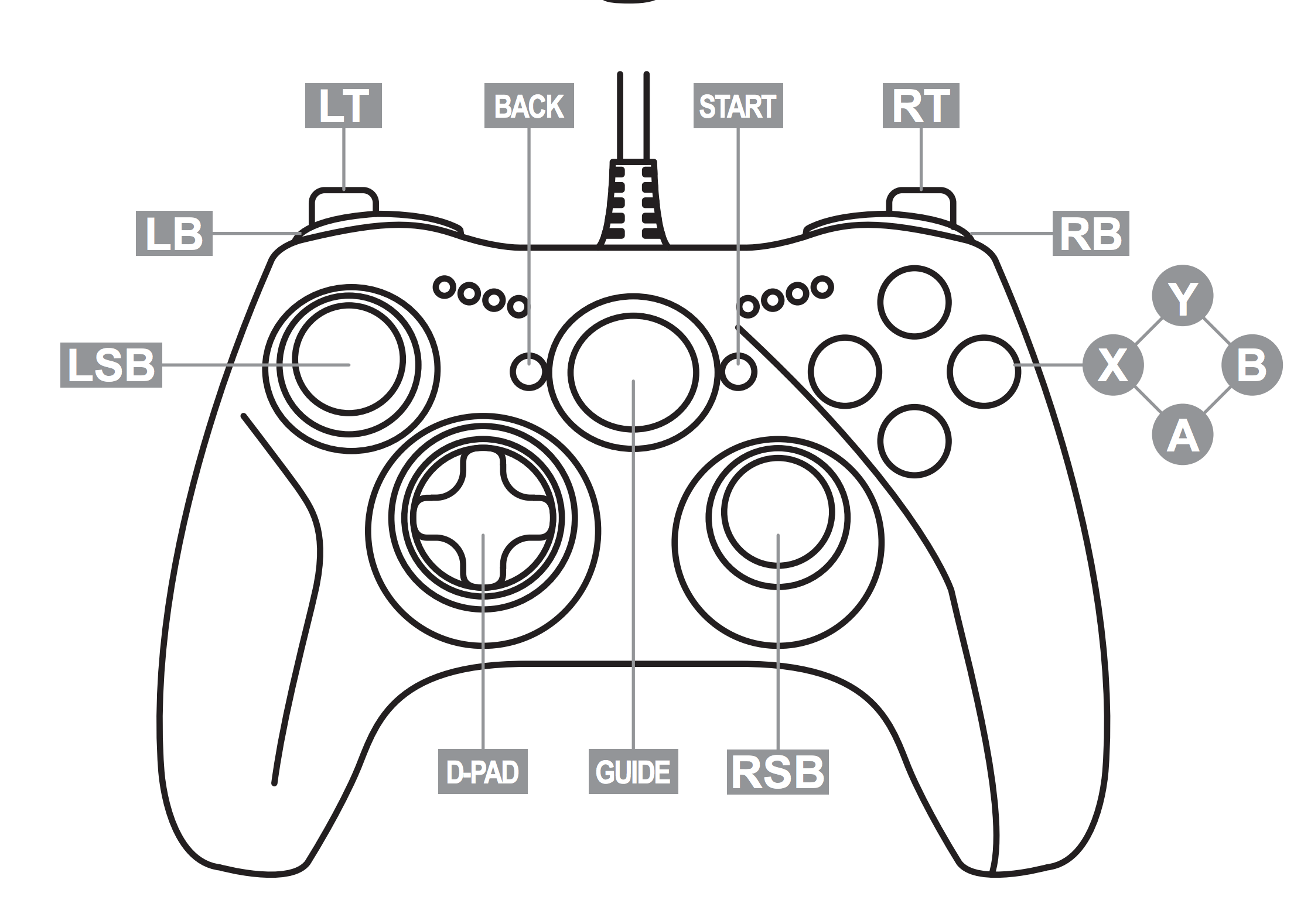
This is the mapping I found:
| Sticks | Gamepad API axes mapping |
|---|---|
| LSB | axes[0], axes[1] -> leftRightAxis, upDownAxis |
| RSB | axes[2], axes[3] -> leftRightAxis, upDownAxis |
| Buttons | Gamepad API buttons mapping |
|---|---|
| A | buttons[0] |
| B | buttons[1] |
| Y | buttons[2] |
| X | buttons[3] |
| LB | buttons[4] |
| RB | buttons[5] |
| D-PAD | Gamepad API buttons mapping |
|---|---|
| Up | buttons[12] |
| Down | buttons[13] |
| Left | buttons[14] |
| Right | buttons[15] |
The site can only do zooming (A for zoom in, B for zoom out) and panning (using LSB). Things to improve are probably smooth zooms by using the RSB instead of button presses, and using vector map tiles instead of raster. Currently, I’m not working on any serious side project on top of this. Maybe navigate Google Maps using the gamepad, or have switchable maps? ┐( ̄ ~ ̄)┌